
Brian Abell
How to Fix Your Desk Posture (Without Spending a Ton of Money)
Lifestyle
.webp)
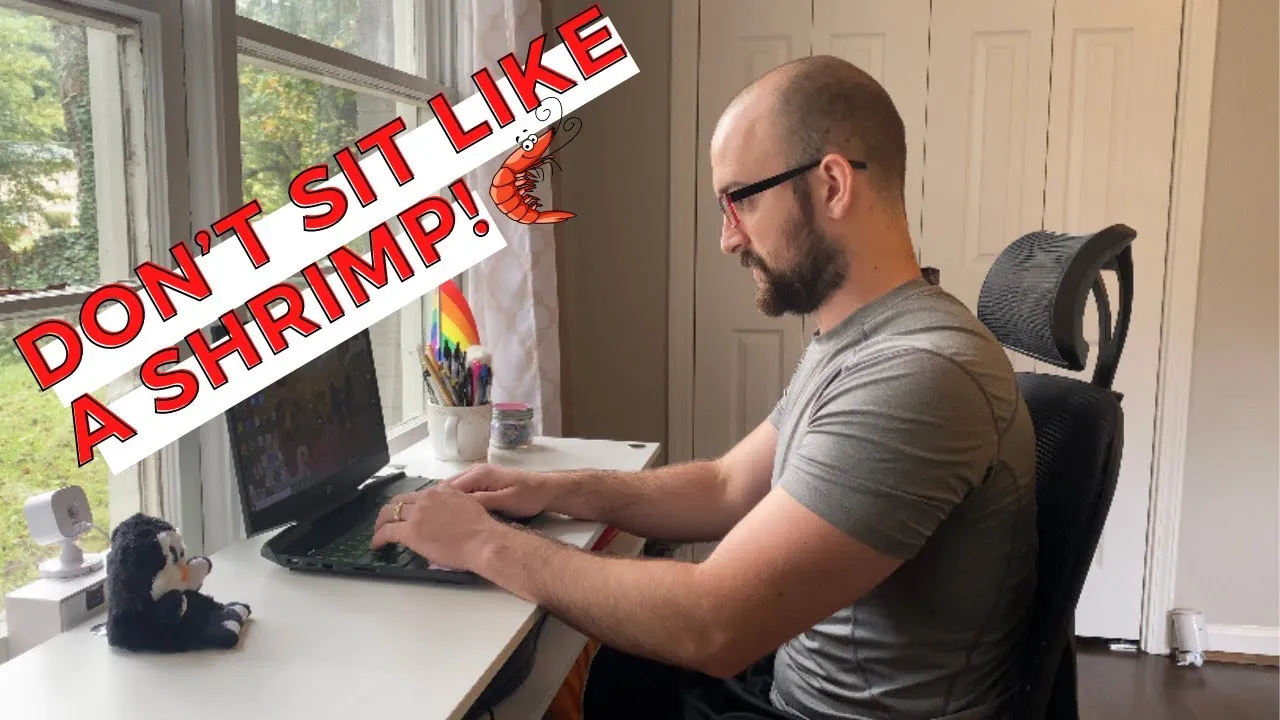
TL;DR: Raise your laptop screen to eye level using books or a stand, and put something under your feet so they rest flat. These two free fixes address the most common causes of desk-related pain: neck flexion from looking down and hip strain from dangling feet.
One of the most common causes of chronic pain that our clients deal with on a day-to-day basis is actually how they sit at their desk. Most of us can't change the fact that we have to sit at a desk to get our work done, but we can change what our desk setup looks like.
Here are a few ways you can do that without a huge expense.
When you're sitting at a desk with your laptop screen low (the way most of us do), you're in a forward hunched position from your head all the way down your entire spine.
A lot of problems come from the setup not being ideal for posture. It leads to internally rotating your shoulders, your head looking down, neck discomfort, and eventually back pain.
If you have your laptop not elevated at all, you have to look down to see your screen comfortably. That puts your neck in flexion for 6, 8 hours a day, however long you're working.
Good news: these fixes cost nothing.
Get some kind of riser to lift that screen up. You can use books, boxes, whatever you have around your house. Slide something underneath the laptop, and right away your eyesight goes from looking down with that bent neck to straight ahead. Your neck is neutral, and that keeps you in a much friendlier position throughout your work day.
Moving down the body: the position of your feet causes a lot of lower back pain, and for some clients even foot, lower leg, and hip pain.
If your chair is high enough so you have good posture in your shoulders and neck, that sometimes leaves your feet not stable on the ground. That can lead to dumping your hips forward. Put something underneath your feet (books, boxes, etc.) so your feet rest flat. The position in your hips will be much better, and you still get to maintain that nice neutral neck and straight line of sight.
These are bonus options if you want to invest a bit more:
ItemWhy It HelpsGood chairBack support, comfortable for all-day sittingExternal keyboardKeeps shoulders down instead of reaching upExternal mousePrevents shoulder shrugging from trackpad use
Using the trackpad can lead to poor posture. By reaching up, you're raising your shoulders, getting rounded forward and shrugging up. If you carry stress in your neck and shoulders, that makes it worse.
Having the mouse to the side keeps your shoulders down so you can maintain proper posture. Same reason for a keyboard: if you have something closer to you or in a tray underneath, you maintain much better posture than having to reach for the laptop now that you've elevated it.
Further reading:



.webp)


